A Little Space, A Little Calm
Turn Any Wallpaper into a Clean Desktop Organizer
Upload your favorite photo, add soft translucent zones for your apps and projects, let auto-palette match the colors, and export an original-resolution PNG with zero watermark. Images never leave your browser.
- 100% browser-local privacy
- Original resolution PNG (up to 8192 px)
- Auto color matching
- No watermark · No sign-up
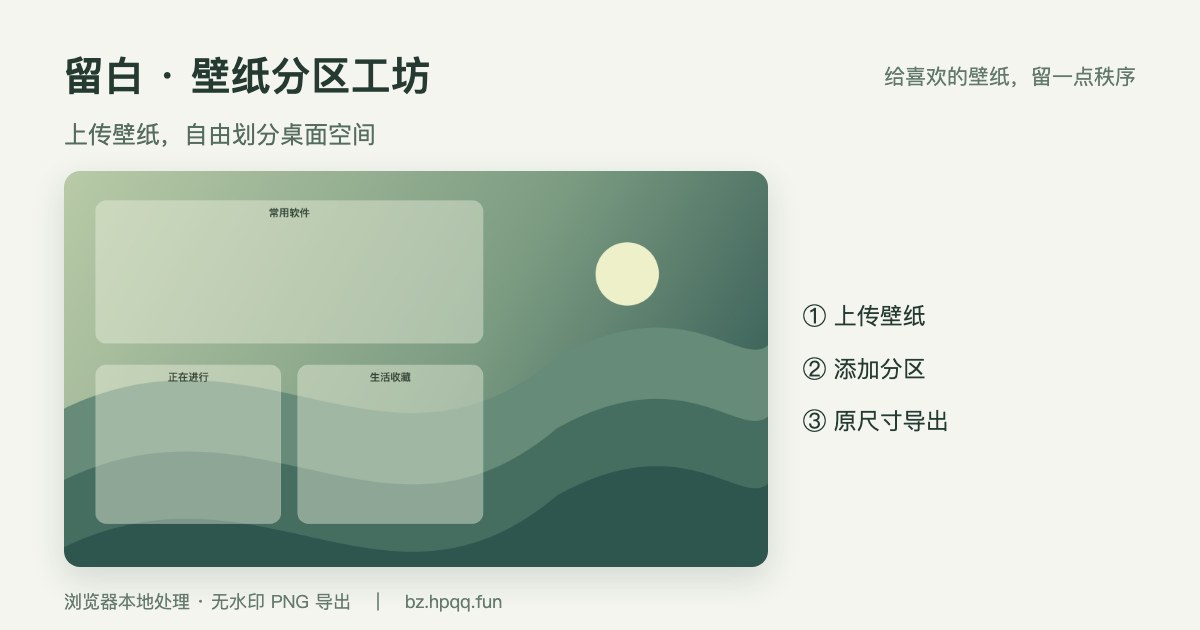
3 Steps to an Organized Desktop
-
Upload Any Wallpaper Locally
Drop a PNG, JPEG, or WebP image (up to 40 MB / 32 MP). Wallpaper Studio reads your image in browser memory and extracts a matching soft color palette automatically.
-
Pick a Layout & Customize Zones
Start with Daily 3-Zone, Grid 4-Zone, or Focus 2-Zone, then drag, resize, duplicate, or rename each section. Fine-tune fill opacity, border tint, corner radius, and heading size.
-
Export Clean Full-Resolution PNG
Download a crisp, watermark-free PNG at your image's exact native resolution—ready for MacBook Retina, 4K, or ultrawide Windows displays.
Guides by Platform & Layout
Simple Pass Pricing — Try Free First
Upload your own wallpaper and test every layout free in the interactive demo. Unlock full-resolution PNG export anytime via Creem with zero account registration.
1-Day Pass
$1One-time payment. Active for 24 hours from first login. Great for making a quick wallpaper today.
7-Day Pass
$2One-time payment. Active for 168 hours from first login. Ideal for dialing in home, work, and dual-monitor setups.
Monthly Subscription
$3 / moAuto-renews monthly via Creem. Cancel anytime from the customer portal; access continues through your paid period.
Your wallpapers never upload to our servers—all Canvas rendering runs in your browser. Edits are not saved across page refreshes, so export your PNG once you like the layout. Wallpaper Studio does not install desktop apps or rearrange OS files automatically.
Frequently Asked Questions
Do my uploaded wallpapers leave my browser?
No. Every step—image reading, dominant palette matching, zone drawing, and PNG export—happens locally in your browser. Your photos stay private on your device.
Is there any watermark on exported wallpapers?
Never. Exported PNGs contain only your wallpaper and your styled organizer sections at full original pixel dimensions.
What if I switch backgrounds after arranging my zones?
Zones use relative coordinates, so uploading a new wallpaper keeps your layout proportions intact and automatically refreshes the zone palette to match the new photo.
Can I use it on both Mac and Windows?
Yes—it runs in any modern desktop browser and outputs a standard PNG image compatible with macOS, Windows 10/11, Linux, and multi-monitor displays.